
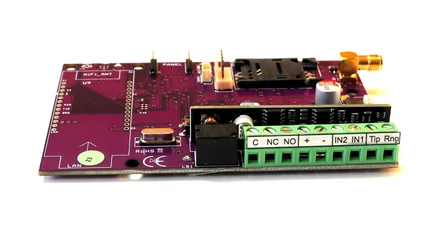
ProLine 4G Cloud – Overview
- Professional 2G/4G GSM/GPRS/LTE communicator, applicable alongside alarm control panels or as a standalone line simulator
- 2 inputs (NO/NC), 1 output (expandable with additional relays)
- Capable of sending SMS or voice messages to 8 phone numbers for various events (alarm, power failure, sabotage)
- Output control via free call or SMS commands, for up to 1000 authorized phone numbers
- Event logging: storage of 16,000 events, logging of GSM signal strength
- Cloud-based remote programming, free mobile application for control and receiving notifications
- Automatic translation and forwarding of Contact ID codes into text-based SMS
GSM Communicator Module for Alarm Centers – Contact ID SMS Translation
One of the outstanding features of the ProLine 4G Cloud is that it automatically converts Contact ID codes from the alarm center (e.g., alarm, fault, activation, etc.) into easy-to-understand text SMS messages and forwards them to the specified phone numbers. The advantage is that end users receive clear, interpretable information about events.
Key Features:
- Unique, freely editable SMS text can be assigned to every Contact ID event; 250 events and 250 zone names can be specified.
- Notification recipients can be selected individually from the 8 phone numbers for each event.
- A single event can be forwarded to multiple recipients.
- The translation table is fully customizable: new event codes and zones can be added.
The ProLine 4G Cloud is not only suitable for residential alarm systems but can also be used as an industrial GSM module in manufacturing plants, warehouses, or remote sites.

Cloud-based Programming and Remote Control – Cloud Manager Functions
The cloud-based management of the ProLine 4G Cloud module allows you to program the GSM module quickly and safely from anywhere via the internet, as well as configure Contact ID translation rules through a web interface.
How to set up the system?
1. Establishing a Cloud Connection
- Insert the SIM card into the module and register the device at www.ascloudmanager.hu!
- After successful registration, the device is available online for remote programming.
2. Editing the Contact ID SMS Translation Table
- On the web interface, select the "Contact ID to SMS Translation" menu.
- Upload or edit the texts corresponding to Contact ID events and select which phone numbers each event should be forwarded to.
- The system allows assigning unique messages and recipients to every event and zone.
3. Saving and Activation
- Save the changes; they take effect immediately in the module.
- The alarm center must dial "5555" to forward Contact ID events. If you want to send all messages to a specific number, use the format 5555+phonenumber (e.g., 5555+44201234567).

Advantages:
- No need for on-site programming; all settings can be completed online.
- Fast, transparent Contact ID management that significantly reduces the chance of errors.
- Users and partners receive immediate, personalized information about every event.
Expansion Panels and Accessories – EXP Relay and GSM Antenna
These accessories expand the functionality of the ProLine 4G Cloud system, allowing for the control of more devices, increased communication stability, and convenient, secure remote access and setup.
- EXP Relay expansion panel: adds 1 extra relay output to the ProLine 4G module, making it suitable for controlling additional devices (e.g., gates, barriers, lighting).
- EXP Relay3 expansion panel: provides three additional relay outputs, allowing the module to have up to 4 outputs in total. Each can be independently configured (monostable/bistable operation).
- High-gain GSM antenna: for use in areas with weak signal strength to improve the quality and stability of the GSM connection.
- External battery: ensures continuous system operation during power outages. Note: the battery compatible with the module can only be purchased from the manufacturer.
- WiFi/BT Programmer: enables programming the module via Bluetooth or WiFi connection, simplifying on-site setup.
- Cloud Manager application: used for remote control and programming of the module, supporting multiple users and devices.
In case of any questions, feel free to contact us, we are happy to assist! Detailed installation and programming guides can be found at www.ascglobal.eu/proline-gsm-4g-cloud.

